Quick Binarium Registration 2026: How to Open an Account in Minutes
Opening a Binarium account in 2026 is a quick and straightforward process that allows new users to start trading in just a few minutes. The platform is designed with simplicity in mind, making registration easy for beginners while still providing access to useful trading tools and a demo account for practice.
In this guide, you’ll learn how to complete the Binarium registration process step by step and set up your account quickly so you can begin exploring the platform with confidence.
In this guide, you’ll learn how to complete the Binarium registration process step by step and set up your account quickly so you can begin exploring the platform with confidence.

Quick Overview of Step-by-Step To Sign Up on Binarium
- Visit the Binarium website
- Provide an email, password, and your personal details.
- Start your journey.
Before getting into the details of each step, traders can check the table below to have an overview of the account creation process.
|
Registration Requirements |
Yes/No |
|
Email Sign-up |
Yes |
|
Phone Number Required |
Yes |
|
Google Account Login |
Yes |
|
Apple ID Login |
No |
|
Facebook Login |
No |
|
Full Name |
Yes |
|
Country of Residence |
Yes |
|
Date of Birth |
No |
|
Address Details |
No |
|
Email Verification |
Yes |
|
Phone Number Verification |
No |
|
Financial Status Questionnaire |
No |
|
Trading Experience Questionnaire |
No |
Step 1: Visit the Binarium Website
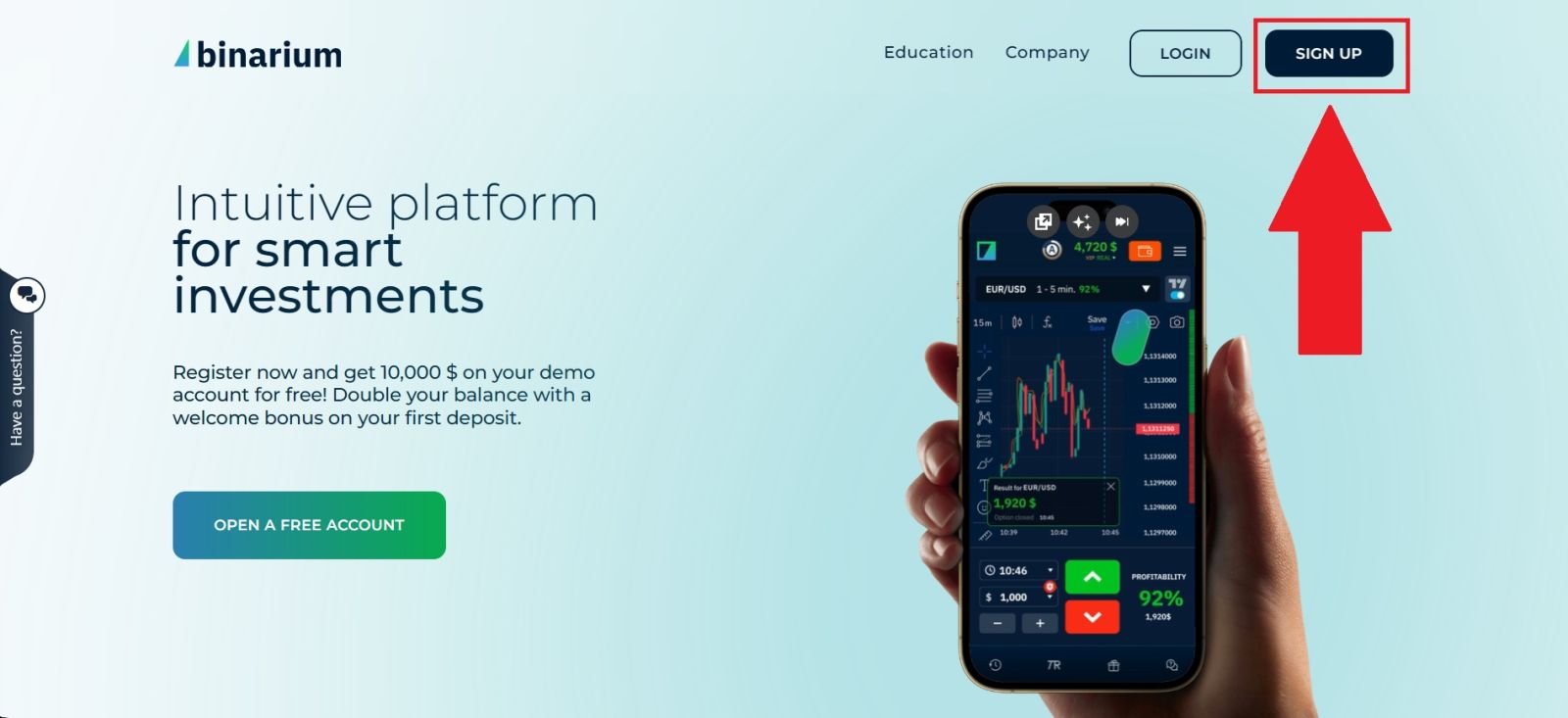
Start by navigating to the official Binarium website, ensuring you are accessing the correct URL to protect yourself against potential phishing attempts. The platform provides a clear, user-friendly interface that will seamlessly guide you directly to the registration page to begin your account setup.Once on the website, click on [SIGN UP] to go to the registration form.
Step 2: Fill in The Registration Form
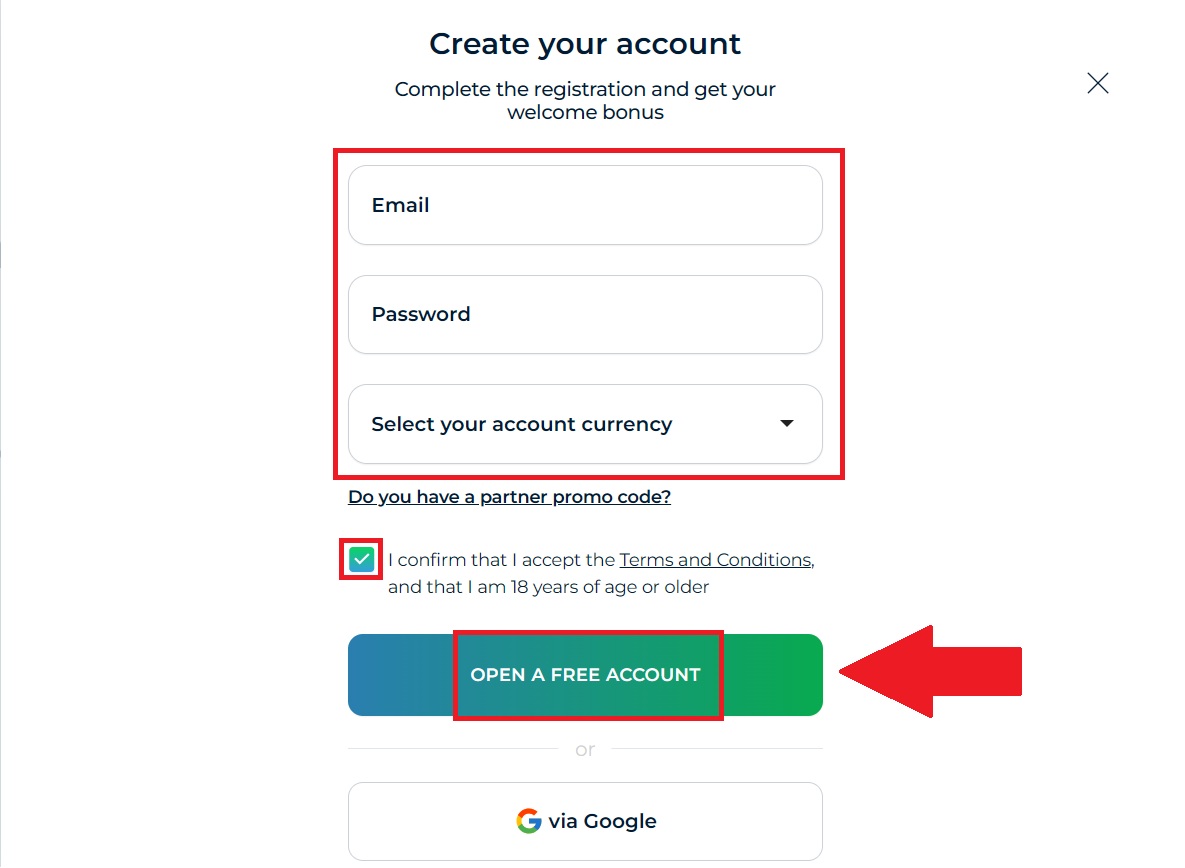
To complete your registration based on the form in the image, follow these steps:- Email: Enter a valid email address that you have regular access to. This will be used for account verification and security alerts.
- Password: Create a strong, unique password. It’s best to use a mix of uppercase and lowercase letters, numbers, and symbols.
- Account Currency: Click the dropdown menu to select the currency you want to use for your balance (e.g., USD, EUR). Choose carefully, as this usually cannot be changed later.
Step 3: Launch Your Binarium Trading Dashboard
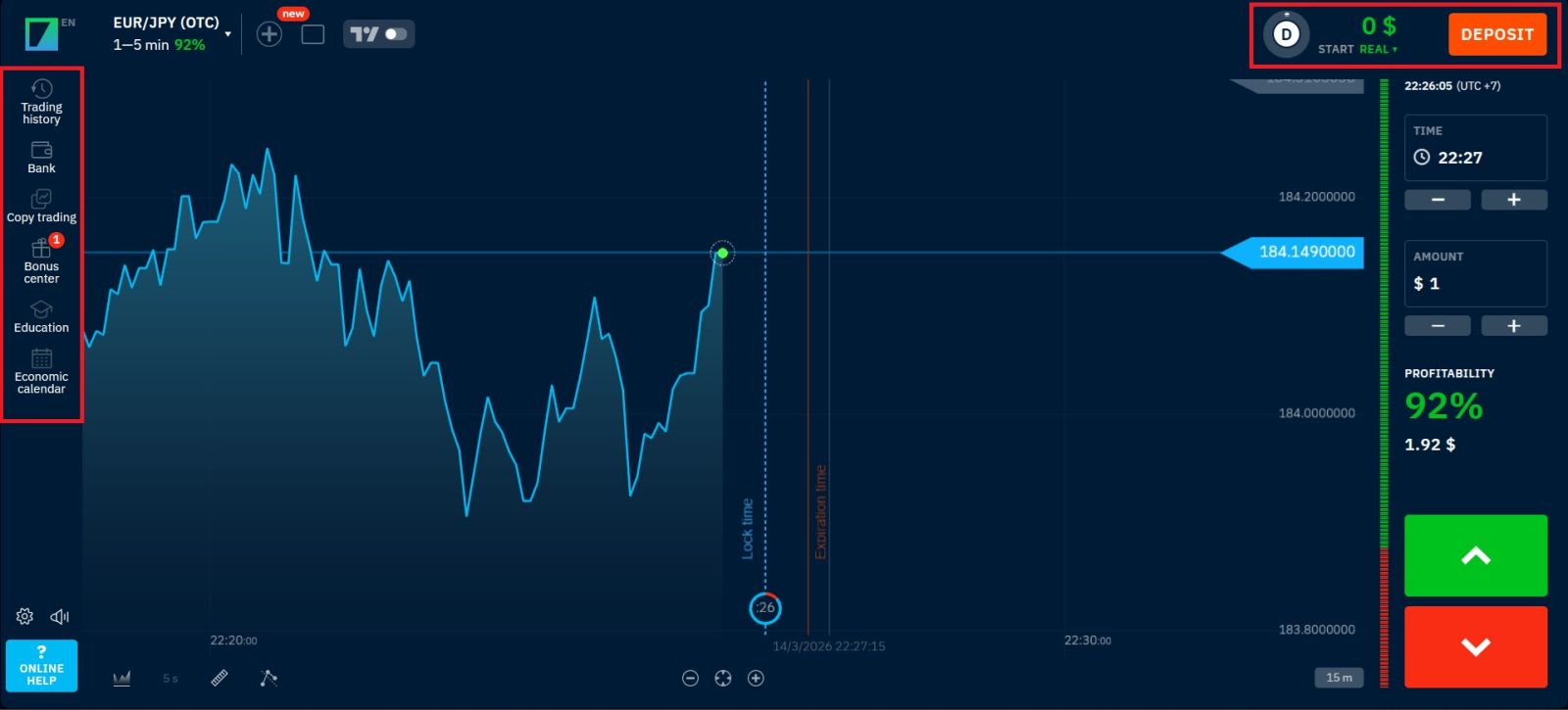
After completing the sign-up process, you will be redirected to your personal Binarium member area. From here, you can take the following actions:- Configure Profile Security: Set up your personal information and add an extra layer of protection to your account.
- Toggle Trading Modes: Seamlessly switch between the Demo environment for practice and the Live market for real-money trading.
- Review Market Assets: Browse through the extensive list of trading instruments, from currency pairs to digital assets.
- Initiate Verification: Begin the document submission process to verify your identity for future withdrawals.
- Fund Your Account: Explore various deposit options to prepare for your first live trade.
Conclusion: Open Your Binarium Account Quickly and Start Trading
Creating an account on Binarium is a fast and straightforward process that allows beginners to start exploring the trading platform in just a few minutes.Once registered, users can immediately access features such as a demo account for practice, trading tools, and account management options. Taking time to explore the platform and practice on a demo balance before trading with real funds can help build confidence and improve your overall trading experience on Binarium.
FAQs
Yes, creating an account on the platform is completely free and only requires basic details such as your email and password. After registration you can access the platform dashboard and start using the demo account before depositing real funds.
To create an account you typically need a valid email address, a secure password, and to choose your preferred account currency. After submitting the form you may need to confirm your email to activate the account.
Yes, the platform allows registration through email or by connecting social accounts such as Google or Facebook, which can make the sign-up process faster and more convenient.
Yes, after completing the registration form you usually receive a confirmation email with a link that activates your account and allows you to log in and access the trading platform.
Yes, once your account is created you are typically provided with a demo balance of virtual funds so you can practice trading and learn how the platform works without risking real money.